I built a random forest that predicts expected goals (XG) in the online soccer game HaxBall. When it called a kick a goal it was right 75% of the time, but it caught only 16% of the goals that were scored. High school students who played on it told me the scores ran too low.
I worked on this for about 2 weeks over the winter holidays, using data recorded from hundreds of goals, thousands of matches and millions of player positions.
What is HaxBall?
HaxBall is an online physics-based multi-player soccer game. Each player is a circle that can kick and interact with the ball. You move using WASD (or arrows) and space to kick.
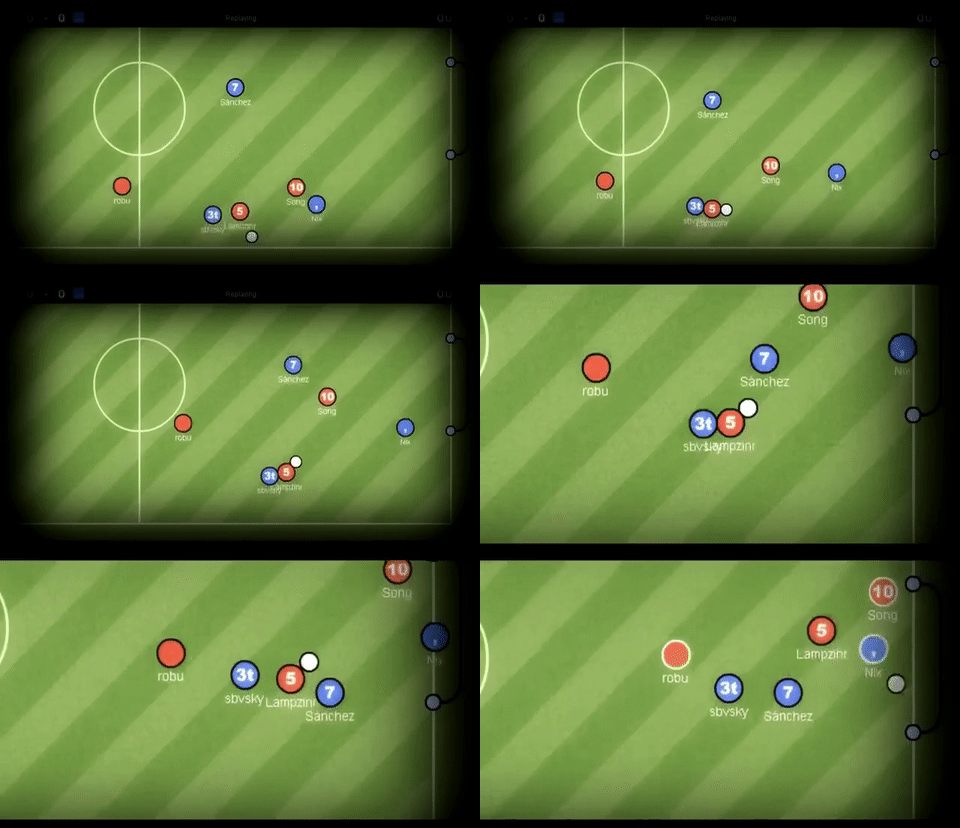
GIF credit to GIPHY.
What is XG (expected goals)?
XG is the probability that a given kick results in a goal. The video below explains it for soccer.
Predicting XG in HaxBall
Predicting XG using machine learning was a multi-step process.
The steps below outline the type of work I performed:
- Exploratory data analysis
- Feature Engineering
- Comparison of Models and Features
- Discussion and Results
Usually, this would not be something anyone could do in one sitting. (Maybe at a hackathon with 3 Red Bulls.)
Exploratory data analysis
Before creating a machine learning model, I had to do some exploratory data analysis to understand the types of data we had collected. This was the beginning of brainstorming for the feature engineering I would do later. The main goal of this data analysis was to see what types of data we had and how the data was obtained.
Here are two example schemas that I used often.
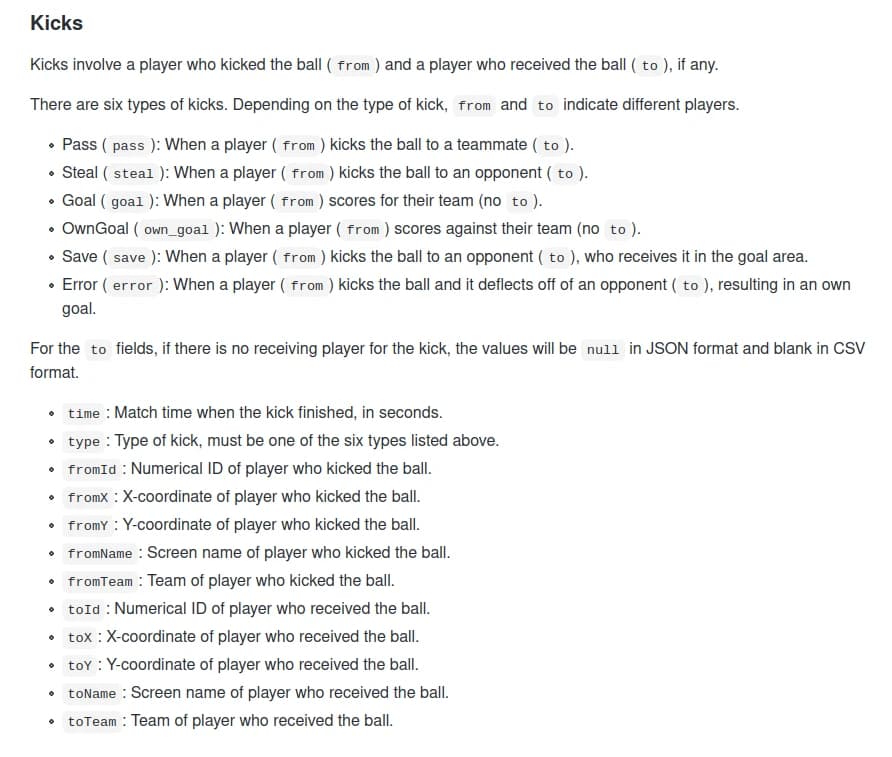
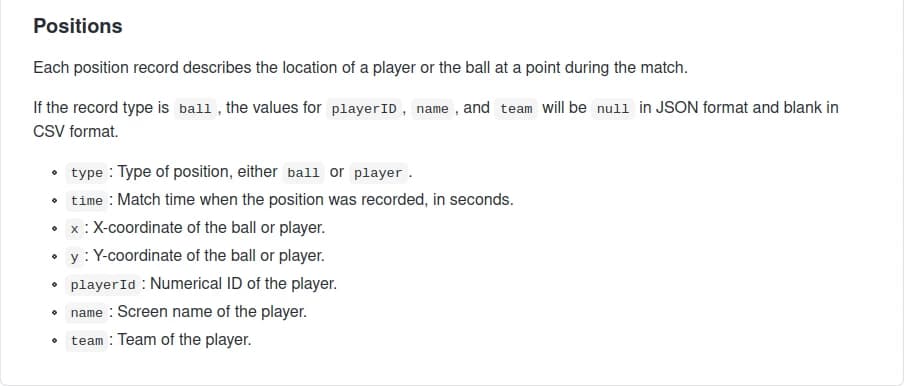
The complete data schema for the data I worked with is on the HaxClass repository. This repository also contains the source code for Headless API that recorded data from matches.
Once I had a good understanding of the data collected, I started creating different features, the inputs to the model. I had to brainstorm features that would make the model better at predicting XG. This process of brainstorming, generating and evaluating features, was a process I repeated a couple of times before I picked my final set of features.
Feature engineering
I had to draw comparisons between soccer and HaxBall to create features that would make the model better at predicting XG. HaxBall is less complex than soccer; this made the task of predicting XG a bit easier. In HaxBall, players can only kick and block the ball, while in soccer players can make different types of headers and trick shots, etc.
Some ideas for features I wanted to use as input:
- Goal Distance (numerical): the distance from the ball to the goal.
- Goal Angle (numerical): the angle in radians between the line of the shot and the goal line, 0 for parallel to the goal line, pi/2 for perpendicular to the goal line.
- Defender within a distance (numerical): The number of defenders within a predefined distance from the ball.
- Closest Defender (numerical): The distance to the closest defender.
- Players within a box (numerical): The number of players in a rectangle coming out from the goal to the ball.
- Player in box (boolean): Whether there are any players within the rectangle created by defenders_within_box.
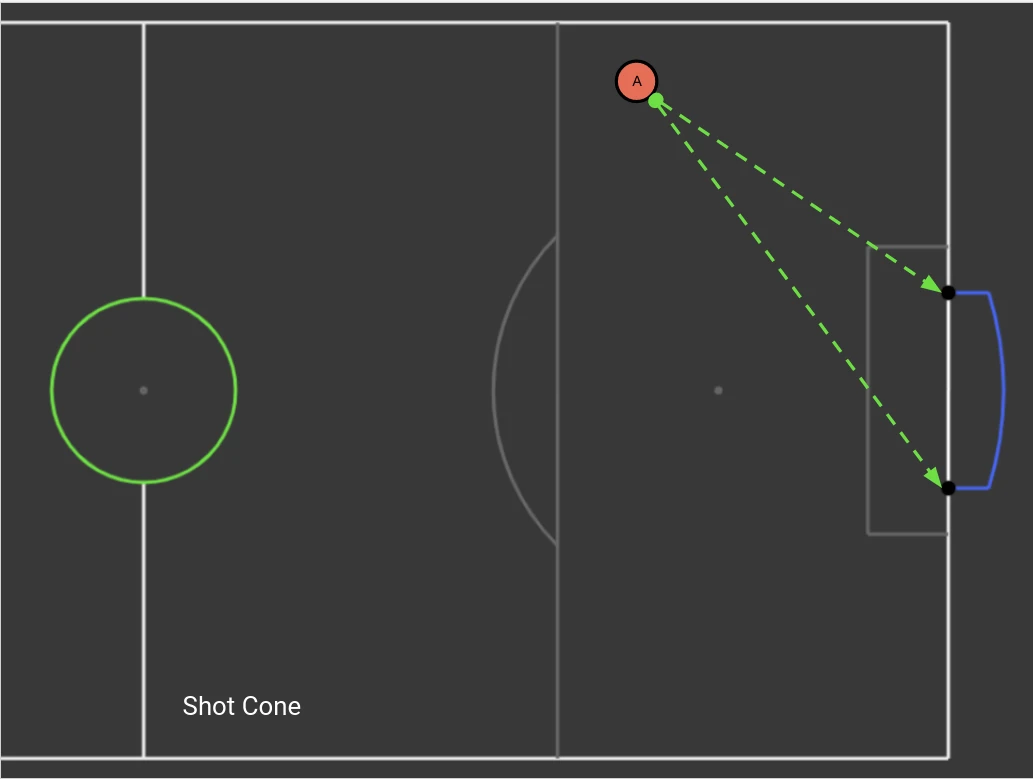
- Players within the shot (numerical): The number of players in a cone from the goalposts to the ball.
- Player in shot (boolean): Whether there are any players within the rectangle created by defenders_within_shot.
- Ball speed (numerical): Speed of the ball within a 1-second interval using distance over time.
Below is the code for the two features from the cone, defenders_within_cone and in_shot.
The two shot-cone features, defenders_within_cone and in_shot, count the opponents standing inside the triangle between the ball and the two goalposts. The code is in the haxml repository.
Diagram of the cone:
The function below adds the speed of the ball to the data we already collected. This allows us to use the speed of the ball as an input to our model.
def speed_ball(match,kick,offset):
    '''
    Return the speed of the ball over the offset(1 second)
    '''
    speed = 0
    if kick["time"]>1:
        # get positions 1 second before and during kick
        pos_before = get_positions_at_time(match["positions"]
                                           , kick["time"] - offset)
        pos_after = get_positions_at_time(match["positions"]
                                          , kick["time"])
        # get position of the ball 1 second before and during kick
        ball_before = list(filter(
            lambda person: person["type"] == "ball",position_before))[0]
        ball_after = list(filter(
            lambda person: person["type"] == "ball",position_after))[0]
        # calculte distance using distance forumula(stadium_distance)
        distance = stadium_distance(ball_before['x'],ball_before['y'],
                                    ball_after['x'],ball_after['y'])
        time = (ball_after['time']-ball_before['time'])
        speed = distance/time
    return speed
Comparison of models and features
After I had created some features, I had to figure out what kind of model to use for the task of predicting XG. I tried the following models:
- Random Forest
- K Nearest Neighbors
- Logistic Regression
- ADA Boost
- Gradient Boost
I decided to focus on the random forest classifier because it performed well with minimal parameter tuning. Below you can see the different models on the final feature set.
table
| model | parameters | accuracy | precision | recall | auc roc |
|---|---|---|---|---|---|
| Random Forest | max_depth=12 | 0.970 | 0.747 | 0.163 | 0.581 |
| Gradient Boosting | n_estimators=100, learning_rate=1.0, max_depth=1 | 0.967 | 0.515 | 0.156 | 0.575 |
| Decision Tree | max_depth=5 | 0.966 | 0.495 | 0.163 | 0.579 |
| K Neighbors | n_neighbors=7 | 0.965 | 0.466 | 0.196 | 0.594 |
| Ada Boost | n_estimators=100 | 0.966 | 0.463 | 0.145 | 0.570 |
| Logistic Regression | random_state=0 | 0.965 | 0.428 | 0.079 | 0.538 |
I compared models and features by using preferred metrics such as accuracy, precision and recall, ROC AUC.
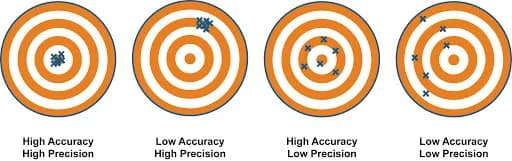
The main metrics I used were precision and recall. Precision is how often a kick predicted to be a goal actually results in a goal. Recall is the fraction of all actual goals that our model correctly predicted to result in goals.
While iterating over features, I had to compare the model with all features and different combinations of the features. Here is one of the final comparisons I did.
table
| parameters | features | accuracy | precision | recall | auc roc |
|---|---|---|---|---|---|
| max_depth=12 | goal_distance, goal_angle, defender_dist, closest_defender, defenders_within_box, in_box, in_shot, ball_speed | 0.970 | 0.747 | 0.163 | 0.581 |
| max_depth=12 | goal_distance, goal_angle | 0.966 | 0.484 | 0.066 | 0.532 |
| max_depth=12 | goal_distance, goal_angle, defender_dist, in_shot, ball_speed | 0.970 | 0.660 | 0.231 | 0.613 |
| max_depth=12 | goal_distance, goal_angle, defender_dist, closest_defender, ball_speed | 0.970 | 0.636 | 0.229 | 0.612 |
| max_depth=12 | goal_distance, goal_angle, ball_speed | 0.969 | 0.612 | 0.220 | 0.607 |
The final features I chose were:
- Goal Distance (numerical): the distance from the ball to the goal.
- Goal Angle (numerical): the angle in radians between the line of the shot and the goal line, 0 for parallel to the goal line, pi/2 for perpendicular to the goal line.
- Defender within a distance (numerical): The number of defenders within a predefined distance from the ball.
- Closest Defender (numerical): The distance to the closest defender.
- Players within a box (numerical): The number of players in a rectangle coming out from the goal to the ball.
- Player in box (boolean): Whether there are any players within the rectangle created by defenders_within_box.
- Player in shot (boolean): Whether there are any players within the rectangle created by defenders_within_shot.
- Ball speed (numerical): Speed of the ball within a 1-second interval using distance over time.
The only feature I did not include was players within the shot.
Did my features improve the model?
The way to test the question above is to perform an ablation test where I remove all the features and run the same model on both features.
In the image below, we have a comparison of the model with my features vs the original model.
table
| parameters | features | accuracy | precision | recall | auc roc |
|---|---|---|---|---|---|
| max_depth=12 | goal_distance, goal_angle, defender_dist, closest_defender, defenders_within_box, in_box, in_shot, ball_speed | 0.970 | 0.747 | 0.163 | 0.581 |
| max_depth=12 | goal_distance, goal_angle | 0.966 | 0.484 | 0.066 | 0.532 |
With only goal distance and goal angle, precision was 48% and recall 7%. The full feature set got 75% precision and 16% recall. The recall is still low, and AUC ROC only moved from 0.532 to 0.581: the model rarely calls a goal, and when it does it is usually right. The feature sets with fewer features had better recall (up to 23%) at lower precision.
I deployed the random forest to a website that charts XG for matches.
Why the random forest
Random forest had the highest precision of the six models (75%). K Neighbors had the best recall (20%) and AUC ROC (0.594), and Gradient Boosting reached 52% precision. None of them found more than 20% of goals.
Discussion
Why did these features raise precision from 48% to 75%? I believe they work because certain features are necessary conditions for a goal to happen. You have a higher chance of scoring if you are closer to the goal, you can’t score if players are between you and the goal, if the ball is moving fast you have a higher chance of scoring since the ball will catch the opponent off guard and unable to react.
Above was my hypothesis as to why certain features made our model better than others. The most important feature of my model was the speed of the ball, boosting the model's precision by a significant amount. This can be seen below by ball_speed's SHAP value.
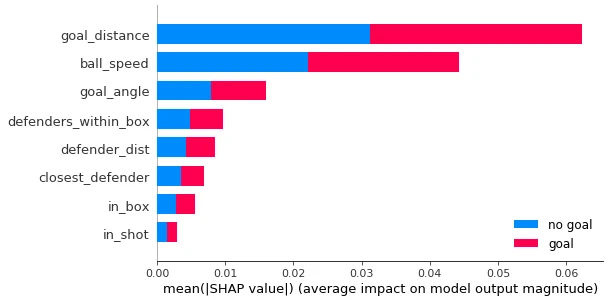
The plot shows SHAP values, which give how much each feature pushed individual predictions up or down, averaged over the data.
Feedback
My feedback came from high school students who are taking a course on sports analytics and got to view the model’s XG predictions for games of HaxBall that they played.
These students were able to notice some errors in our model. We had measurement errors due to kicks from the match they played not recorded by our headless API.
I received feedback about the scores of XG being too low. A kick is never certain to go in, even at goal lines. To the students/players, they believed that a value of 0.6 is too low for a kick right on the goal line. I could have done some post-modeling adjustments to improve the score distributions.
Challenges
Some of the challenges I ran into include typical machine learning or software engineering issues where you don’t know the value a certain feature will add so will it be better to spend more time on a feature you think will provide value or iterate quickly over a smaller feature that you think will bring value.
Most of the project challenges came down to this project being crammed into 2 weeks during the winter holiday season.
I had a couple of features I wanted to work on such as whether a Fast Break was occurring, a boolean value to tell if the speed of the ball was greater than 100 m/s and ended up in the opponent's half, but my heuristic was poor or the feature was too similar to the other features, thus not really having an impact on the model’s performance.
There were other features I wanted to implement such as time length of a possession, and splitting the field into sectors.
I probably could have tuned the parameters for the random forest classifier to optimize the results of the model as well.
Things I enjoyed about this project
Disclaimer: Data science is not my main area of expertise. I enjoy back-end web development and info/system/network security.
I enjoyed being able to work in a one-on-one environment, receive feedback and advice on the model and overall software engineering.
I liked being able to see my results on a website.
I learned a lot about making interpretable data science results. Also, areas in my software engineering skill set that I can improve on!
Links and references
The hosted demo is no longer running (its backend is gone). The data collection code is in the haxclass repository.
My notebooks and models are in the HaxML repository on GitHub.
Some of the tools I used that you are probably familiar with:
Thank you to Vinesh Kannan for giving me the chance to work on this project.